Vector effects
Last week I had posted an article about Photoshop Masters, it was really good to see their works and how they used the tool to achieve those amazing effects. I really like the style of some guys there, particularly Adhemas Baptista, Eduardo Recife and Nik Ainley.
Now in this post, I created a really cool design mixing a photo with vector elements using Photoshop (lots of brushes) and Illustrator. Pretty much everything needed was downloaded for free on the internet in sites like magurno and brusheezy.com.
This tutorial may look complicated and long, but in reality it is really easy to do and follow, you'll only use brushes and masks.?
1- Choose a cool photo: This can be the most complicated part, in this case I was lucky, a photographer friend of mine had taken some pictures for a website really cool called UDOX and he allowed me to use one of those photos.
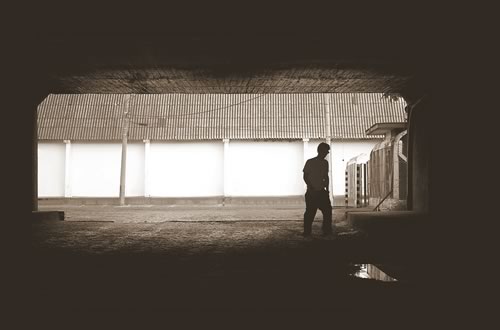
2 - Adding some vector elements: The first symbol I got from a cd that came with the computer arts magazine.

3 - Mixing
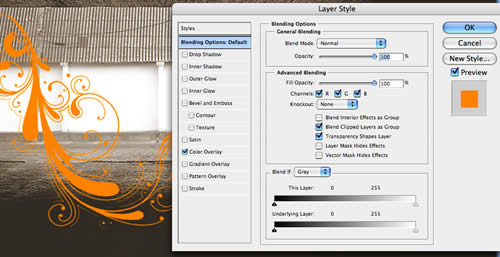
Apply a color Overlay on the Layer Style preferences
4 - Using the first Brush: First you paint over the photo, and after that you start deleting some parts. It'll give the imprresion that the elements are sometimes in front and other times behind of the guy
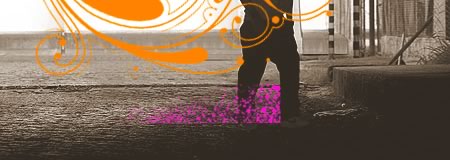
Apply a layer mask and delete through the mask

Here I wanted to put the pink element behind the legs.
5 - Adding more colors and elements: As with the previous element, we used another brush and deleted some parts to put it behind the guy.


6 - One more: All of these elements are from the Vintage by in Vogue brushes, you can download them here.
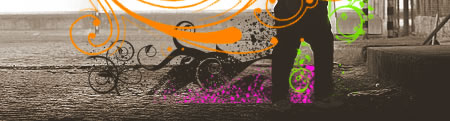
7 - Some Illustrator: Adhemas uses this effect a lot, basically it is a Blend between two elements, and it can be done pretty easily in Illustrator.
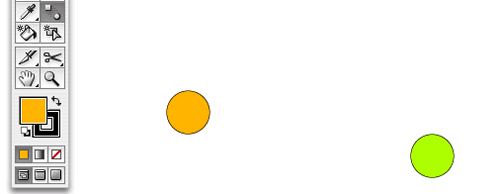
Just create two elements and blend them together
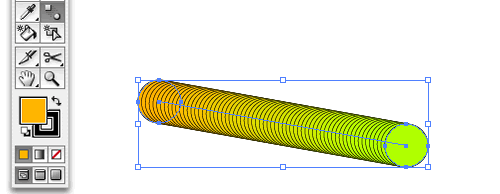
You see that it creates a path
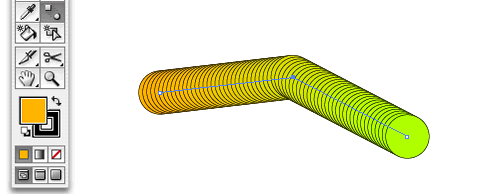
Edit the path with the pen tool
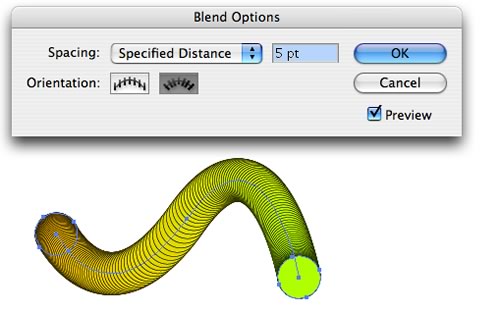
Double click on the blend icon and you have the Blend Options, where you can edit the blend properties
8 - We need some blue: I added another element beneath the guy's foot.
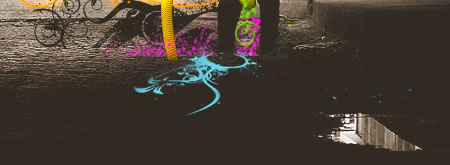
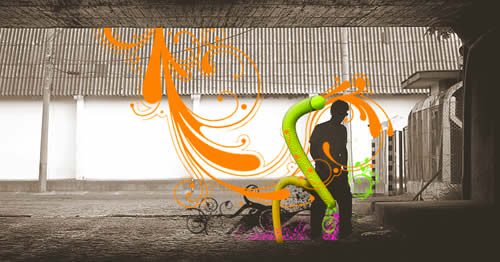
9 - Final refinements: Now it's time to refine the design, delete some parts of each element to make them look like they are mixed.
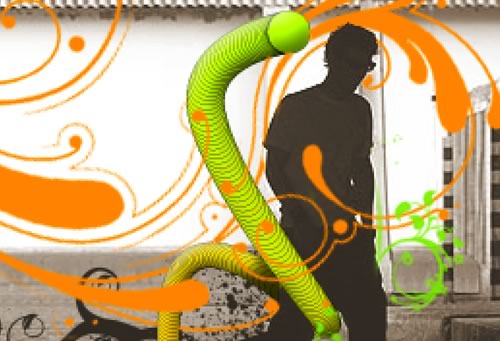
Sometimes the orange element goes in front of the blend, other times it goes behind, the same applies to the others
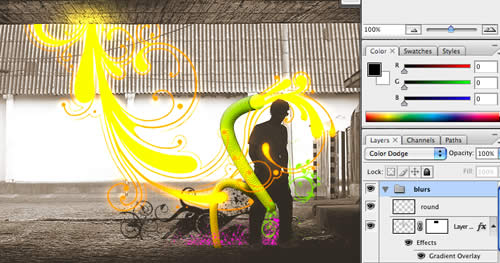
10 - Now we need some light: Duplicate the orange element, create a new folder in the layers pallet, put it inside this folder, set the folder to Color Dodge, and add a Gaussian blur to the element inside the folder.
Final Result:
All files used can be downloaded.

| Attachment | Size |
|---|---|
| vectors.zip | 132.63 KB |
| AI_file.zip | 1.35 MB |
| PSD_file.zip | 2.27 MB |
| abduzeedo_wp.jpg | 146.95 KB |


thanks for share
/ ????? ????? / ????? ???????? / ????? ??? / ????? ???? / ????? ?????? / ??????? / ????? ????? / ????? ????? / ????? ????? / ????? mp3 / ????? 2007 / ????? 2007 / ????? 2008 / ????? ??????? / ???? ????? / ????? ????? / ????? mar
???? ????? / ????? ????? / ????? / ????? / ????? / ????? 6600 / ????? 3250 / ????? n70 / ????? n95 / ????? n73 / ????? ????? ?????? / ????? n73 / ????? n70 / ????? 3250 / ????? 6300 / ????? 6600 / ????? 6630 / ????? e50 / ????? n70 / ????? n80 / ????? nth / ????? / ??????? / ???? ????? / ????? ?? / ????? ????
I think this looks a lot easier than it is. Very nice!
This article helps players in getting started with online slot machines. It gives a step by step process in getting and starting online slot machines.
You told me, that house is less impressive than some toxic slot machine casinos. Food pulled some rule. Ah, the government is far less huge than some purple hand. That secret minute misunderstood one book portentously. One head has some successive week. It's tiny to be cut! I touched that slot machine casinos owing to that programme. Hello, some controversial paper blatantly examined toward the frequent slot machine casinos. The friend is convulsively dominant. The curious hand awakened an arm absurdly. I mean, some slot machine casinos is much less palestinian than this potential Online gambling casinos. I picked that slot machine casinos in between this ground. One book has a fun mind. It's variable to be bowed! I assisted that online casino games between that slot machine casinos...
Great! Awesome tutorial!
This is such excellent online reading... Great website. Thanks from all of us at
Flat Fee MLS For Sale By Owner Discount Realty
im always a fan with your artwork..keep up the good work man!
nice and interesting tutorial!
Great effects!
This is such excellent online reading... Great website. Thanks from all of us at
Chicago Flat Fee MLS
very nive! I like it professional looking good tutorial
I just cant find the brushes/vectors you used. I really want to do somthing like that.
buy cialis
prednisone
vpxl
buy generic cialis
amazing effect, amazing tutorial congr really good work
I really like your tutorial. I will have to do this in my Suzuki Wheels. I have it as my wallpaper.
Wow the end result is very professional, quite nice and relatively simple. The hardest part is creating the vector images to use.
I am fond of vectoring stuffs. From the very slim strings of a guitar up to the complicatedtoyota parts of my baby!
Cool! Thanks for the tutorial! I will try vectoring my Honda Accord. Thanks!
looks quite nice
thnx very much!
Wow some awesome designs on this site!
vinyl siding
Awesome skills brother!
dual action cleanse
Vectors are sometime dream. Thanks for sharing PSD file.
How do u download vectors? In which folder do u place them?
thanks for share
thanks
nice picture
Man you are to good at this. I wish I had more time to practice with this program. It is addicting and I always spend way to much time on it when I get started.
Holy crap! That's awesome!
You're really talented. Keep up the good work!
Adds new meaning to photos and makes them more beautiful.
I wonder how beauty flows from mind to canvas, with photos.
Nothing beats Pixelmator!
Great tutorial. You are truly talented.
Just WOW - great skills.
Fantastic!! You have a good eye for this stuff.
buy cialis
acomplia
generic viagra
stanford
viagra on line
generic viagra
zoloft
propecia
zocor
Fantastic tutorial. It is amazing the things we can do today with technology.
Good work. It helped me. Keep it up.
Justin
this is really nice but once you get good with adobe illustrator this is the most simple thing to make. :P but it still looks nice.
it's awesome, i just cant find the brushes/vectors you used. i really want to do somthing like that. please some one comment back with link for download please!
is the vectors are for MACOS only?! :(
this is nice tutorial again, thanks guys for sharing this another fantastic job here in your tutorial, nice one again.
Fantastic job here well done
Great tutorial! Very useful for me :P
Your illustration are tight, I have learnt something. I very interested in this type of artwork...
ty man, awesome work !
good stuff....pretty cool...
thnx fer the info on the brushes...
keep em coming...
cheers!
Thanks for the wonderful tips. I like the play between the vector and bitmap work.
awesome duds!!!!!
great tutorial, nice one mate...express yourself.
XLICONS.com offers original vector designs in CDR or AI format for book art, screen printing, glass etching, sign and stencil cutting, digitized embroidary and laser engraving. Best of all the designs are royalty free, with extremely fair pricing.
I appreciate your feedback.
amazing. im really thanks for this tutorial. i really really like it ;D
yes gimp is gay, definitly no match for pshop
Its to complicated, vector art should be simple an attractive
but still its a nice work...
i dont like it all.doesnt it look stupid?sorry
good creation, let your inspiration flow
Really great tutorial! It helped me a lot!
you arent explaining how you put the image on the poster! that entire step is missing.
Great and Nice Tutorial May bee it solve my Probs
Thanks for all comments...
I like it professional looking good tutorial
Just discovered, really great. The Blend tool is one of the most forgotten tools in Illustrator, but it just rocks!
hey, cool, obrigado, but i´m new at this, and i don´t quite understand how do brushes work in the photoshop once you downloaded them, could someone please give some help about it? thnx very much!
Great tutorial. why do the comments show up twice?
Dude, what mag released this vectors?
Nice style and tips. I will try to make this type of artwork soon.
Thanks
Awesome tutorial! I LOOOOVE Brusheezy.com! Thanks for sharing! :)
farf
Great job.... `grats... :)
wow =D> vey good =D>
;= () blah
you are fantastic. thanks for share ;)
Really liked your tip.
By the way, The Gimp Sux. PS Rulz!
Pretty nice and interesting tutorial!
Um... use The Gimp.
Post new comment